


HIDEit BrightSign Bar | BrightSign VESA Adapter Mount
Sold out. Get an email when it's back.
$5 US Shipping on $100+. Ships from Nevada.
- Ships in 2 Days
- 14-Day Returns
- Secure Checkout
Thanks for choosing our American Small Business!
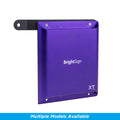
BrightSign Mount for Digital Signage Media Players HD, XT + XD Models

Quickly install a BrightSign Player directly to the back of wall or ceiling mounted display with our BrightSign Bar. Originally designed for a commercial integrator, our BrightSign VESA Mount Adapter is versatile, easy to keep on hand, and easy to install. The HIDEit BrightSign Bar has 3 models each compatible with different Series.
Please verify your BrightSign Model to ensure that you select the correct Adapter Bar.
Series 4 + Series 3: HD4, XD4/3, XT4/3
Small Series 5: HD5, XD5 + LS5
Large Series 5: XT5 + XC5
**Specific Model Numbers in Product Details tab**
- Verify the correct model bar for your BrightSign Player.
- Aligns with anchor holes on most BrightSign Players.
- Won't block any buttons or cable ports.
- Small bracket is easy to keep on hand, ready for any job.
Details + Compatibility
BrightSign media player sold separately.
Product Name: HIDEit BrightSign Adapter
UPC: 858691006463 Series 4/3, 850045107598 Small Series 5, 850045107628 Large Series 5
Includes: (2) M4 x 10mm machined screws and (1) lock washer
Dimensions: H 8.27 x L 4.09 x D 1.77 in (210.06 x 103.89 x 44.96 mm)
Released: 8/2018 | Copyrighted
Series 4 + Series 3 Compatible: HD224, HD1024, XD233, XD234, XD1033, XD1034 XT243, XT244, XT1143, XT1144, XT1144-T
Small Series 5 Compatible: HD225, HD1025, XD235, XD1035, LS425, LS445, LS455, Uniguest SP2
Large Series 5 Compatible: XT245, XT1145, XT2145, XT1145, XC2055, XC4055
Not Compatible: AU335, LS424, LS423, HS124, HS144, HS123, HD223, HD1023, HO523, Series 2, Series 1 or Series 0
Shipping + Returns
Ships Fast from U.S. Warehouses
Most orders ship within 2 business days. Shipping speed depends on the service + carrier you select. US Economy Shipping can take up to 3 weeks. Shipping times are estimates and not guaranteed.
Return Policy
We want you to love your HIDEit Mount! Returns are accepted within 14 days of delivery for store credit. Items must be unused, in original packaging, and in resalable condition. Customers are responsible for return shipping.
Making Mounts Since 2009
-
Heavy-Duty Steel
Powder-coated steel protects your gear from scratches.
-
Snug + Secure Fit
Shaped to fit your exact model, so your gear stays put.
-
Designed in USA
Every HIDEit mount is designed in the USA.

 How to Install
Your Questions, Answered
Which BrightSign models are compatible with this mount?
Series 4 + Series 3 Compatible: HD224, HD1024, XD233, XD234, XD1033, XD1034 XT243, XT244, XT1143, XT1144, XT1144-T
Small Series 5 Compatible: HD225, HD1025, XD235, XD1035, LS425, LS445
Large Series 5 Compatible: XT, XT245, XT1145, XT2145, XC2055, XC4055
Not Compatible: AU335, LS424, LS423, HS124, HS144, HS123, HD223, HD1023, HO523, Series 2, Series 1 or Series 0
Are any buttons or ports obstructed by the mount?
Nope! We intentionally designed our HIDEit BSXT to ensure that no buttons or cable ports are covered!
#afterHIDEit
Real Setups. Real Installs.


Real setups from customers and the AV pros who install HIDEit. Share yours and you're entered in #afterHIDEit, our monthly setup contest.
Be the First to Review
Own this mount? Tell other shoppers how it went.


Tech Setup Ideas + How-Tos

Best Apple TV Mount for Any Setup: Wall, Behind TV, or VESA (All Generations Covered)

Is HIDEit Better Than Amazon Brands?

THE INSIDE STORY: HIDEit Mac Mini Mount Collection

THE INSIDE STORY: HIDEit Universal Soundbar Mount
Since 2009
The HIDEit Story
What do you get when you add a Nintendo Wii, a few glasses of wine and a blow torch together? Usually a recipe for disaster. But in our case, it was different.

