


HIDEit LPC | Lenovo ThinkCentre Tiny PC Mount
Sold out. Get an email when it's back.
$5 US Shipping on $100+. Ships from Nevada.
- Ships in 2 Days
- 14-Day Returns
- Secure Checkout
Thanks for choosing our American Small Business!
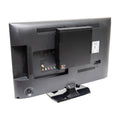
Computer Wall Mount, VESA Mount, Under Desk Mount for Lenovo ThinkCentre M Series Tiny Desktop PC

Declutter your desk and free up some much needed space with the HIDEit Lenovo ThinkCentre Tiny PC Mount! This compact and versatile mounting solution can be wall mounted, under desk mounted, or VESA mounted allowing it to be hidden almost anywhere, in minutes! Our Lenovo ThinkCentre M Series PC Mount utilizes the same design as our best-selling, patented MiniU mount, so you can rest assured that it won’t block ports or interfere with WiFi! With so many ways to mount your Lenovo Tiny PC, how will you HIDEit?
- Wall, under-desk, or VESA mount.
- Easy access to ports and cables.
- Made in the USA from 16-gauge steel for durability.
- Quick and easy to install. Minimal tools needed.
Details + Compatibility
Lenovo Desktop Tiny PC sold separately. Lenovo™ is a registered trademark of Lenovo (Beijing) Limited.
Product Name: HIDEit LPC
UPC: 850017013865
Includes: (4) #8 Flat Head Drywall Screws, (4) Drywall Anchors, (4) M4 VESA Screws
Dimensions: H 6.50 x L 7.25 x D 1.75 in (165.1 x 184.2 x 44.5 mm)
Released: 01/2023 | Patented since 2016
Lenovo ThinkCentre M Series Tiny PCs with dimensions H 7.2 x L 7.0 x D 1.4 in. are compatible with this mount.
COMPATIBLE WITH:
• M70q Tiny
• M70q Tiny Gen 2
• M70q Tiny Gen 3
• M75q Tiny Gen 2
• M80q Tiny
• M90q Tiny Gen 2
• M90q Tiny Gen 3
• M60e Tiny
• P360
Shipping + Returns
Ships Fast from U.S. Warehouses
Most orders ship within 2 business days. Shipping speed depends on the service + carrier you select. US Economy Shipping can take up to 3 weeks. Shipping times are estimates and not guaranteed.
Return Policy
We want you to love your HIDEit Mount! Returns are accepted within 14 days of delivery for store credit. Items must be unused, in original packaging, and in resalable condition. Customers are responsible for return shipping.
Making Mounts Since 2009
-
Heavy-Duty Steel
Powder-coated steel protects your gear from scratches.
-
Snug + Secure Fit
Shaped to fit your exact model, so your gear stays put.
-
Designed in USA
Every HIDEit mount is designed in the USA.

 How to Install
Your Questions, Answered
Can I under-desk mount this?
Yes! Depending on the thickness of the desk, shorter mounting screws may be required.
What are the screws for?
The included flat shorter M4 screws are for VESA mounting your Lenovo ThinkCentre M Series Tiny Desktop PC directly to the back of your computer monitor.
Can the ports face up or down without issue?
Yes!
What if my monitor isn't wall mounted?
No problem! You can VESA mount your Lenovo ThinkCentre M Series Tiny Desktop PC directly to the back of your monitor, using the holes that would normally be used for the monitor stand!
#afterHIDEit
Real Setups. Real Installs.


Real setups from customers and the AV pros who install HIDEit. Share yours and you're entered in #afterHIDEit, our monthly setup contest.
Be the First to Review
Own this mount? Tell other shoppers how it went.


Tech Setup Ideas + How-Tos

Best Apple TV Mount for Any Setup: Wall, Behind TV, or VESA (All Generations Covered)

Is HIDEit Better Than Amazon Brands?

THE INSIDE STORY: HIDEit Mac Mini Mount Collection

THE INSIDE STORY: HIDEit Universal Soundbar Mount
Since 2009
The HIDEit Story
What do you get when you add a Nintendo Wii, a few glasses of wine and a blow torch together? Usually a recipe for disaster. But in our case, it was different.

