


HIDEit PSVR | PlayStation 4 VR Wall Mount Bundle
Sold out. Get an email when it's back.
$5 US Shipping on $100+. Ships from Nevada.
- Ships in 2 Days
- 14-Day Returns
- Secure Checkout
Thanks for choosing our American Small Business!
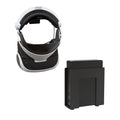
PlayStation 4 VR Wall Mounts for PSVR Headset, Processor Unit + Move Controllers

Have PlayStation 4 VR? Awesome! Our HIDEit PSVR Mounts take your gaming setup into a new reality - one that’s sleek and organized! Ditch the bulky VR display stands and take advantage of unused wall space to create a setup that’s truly unique! Our HIDEit Universal Headset Mount and Universal Small Mount keep your PlayStation VR Headset and Processor Unit off the floor or couch and safe from potential accidents. Plus, your equipment stays organized and ready for your next session!
Want to mount your PlayStation Move Controllers as well? Our Vertical Baseball Bat Mounts store more than sports equipment - it’s the perfect storage solution for your Move Controllers too. No more lost or damaged controllers! Choose the HIDEit PSVR Bundle + Move to mount all of your PSVR equipment.
- Wall mount PS4 VR Headset, Processor Unit + Move Controllers.
- Processor Unit mount allows easy access to buttons + ports.
- VESA mount Universal Small Mount.
- Tabs prevent Headset + Move Controllers from slipping.
Details + Compatibility
PS4 VR Processor Unit, PS4 VR headset, + PS4 VR Move Controllers sold separately. PlayStation®4 and PS4® are trademarks of Sony Corporation of America.
Product Name: HIDEit PSVR Bundle
UPC: HIMPSVRBNDL
Includes: Uni-H Mount for VR Headset, Uni-S Mount for VR Processor Unit, (4) #8 Flat Head Drywall Screws, (4) Drywall Anchors, (2) M4 and (1) M6 VESA Screws
Dimensions: Uni-H: H 4.5 x L 3.0 x D 2.0 in (114.3 x 76.2 x 50.8 mm), Uni-S: H 5.00 x L 5.00 x D 1.0 - 1.85 in (127.0 x 127.0 x 25.4 - 46.99 mm)
Product Name: HIDEit PSVR Bundle + Move
UPC: VR Move Bundle HIMPSVRBNDLMV
Includes: Uni-H Mount for VR Headset, Uni-S Mount for VR Processor Unit, (2) VBat Mounts for Move Controllers, (8) #8 Flat Head Drywall Screws, (8) Drywall Anchors, (2) M4 and (1) M6 VESA Screws
Dimensions: Uni-H: H 4.5 x L 3.0 x D 2.0 in (114.3 x 76.2 x 50.8 mm), Uni-S: H 5.00 x L 5.00 x D 1.0 - 1.85 in (127.0 x 127.0 x 25.4 - 46.99 mm), VBat: H 2.00 x L 2.50 x D 2.51 in (50.8 x 63.5 x 63.75 mm)
Released: 4/2020
COMPATIBLE WITH: PS4 VR Processor Unit, PS4 VR headset, + PS4 VR Move Controllers
Shipping + Returns
Ships Fast from U.S. Warehouses
Most orders ship within 2 business days. Shipping speed depends on the service + carrier you select. US Economy Shipping can take up to 3 weeks. Shipping times are estimates and not guaranteed.
Return Policy
We want you to love your HIDEit Mount! Returns are accepted within 14 days of delivery for store credit. Items must be unused, in original packaging, and in resalable condition. Customers are responsible for return shipping.
Making Mounts Since 2009
-
Heavy-Duty Steel
Powder-coated steel protects your gear from scratches.
-
Snug + Secure Fit
Shaped to fit your exact model, so your gear stays put.
-
Designed in USA
Every HIDEit mount is designed in the USA.

 How to Install
Your Questions, Answered
What mount is used to mount the PSVR Move Controllers?
When doing R+D our team discovered our Universal Vertical Bat Mount is a perfect fit for the Move Controllers.
#afterHIDEit
Real Customers. Real Setups.


Every setup here belongs to a real customer. Share yours and you're entered in #afterHIDEit, our monthly setup contest.
Loading reviews...


Gaming Room Ideas + How-Tos

How to Build a Floating Gamer Wall

Can You Mount a Console or PC Without Drilling Into the Wall?

Pegboard Gaming Setup: Mount Your Gear Without Drilling Into the Wall

Brand New Day. Brand New Wall.
Since 2009
The HIDEit Story
What do you get when you add a Nintendo Wii, a few glasses of wine and a blow torch together? Usually a recipe for disaster. But in our case, it was different.

