
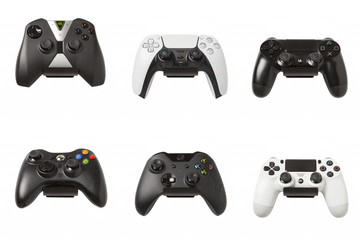
Multiple game controllers securely held in steel HIDEit Uni-C Mount.
Game room setup displaying PlayStation controllers using HIDEit Uni-C Controller Mounts.
PlayStation 5 controllers mounted, using the HIDEit Mount Uni-C, behind the TV on the wall and next to the TV.
The HIDEit Mounts Uni-C Controller Mount is made from heavy-gauge steel.
Xbox video game controller wall mounted next to Xbox console for easy access and charging.
HIDEit Mounts makes it easy to love your space! HIDEit is an American company with over 1 million units sold globally.
White PlayStation 4 controller wall mounted in HIDEit Mounts Uni-C White Mount.
HIDEit Mounts rubber-dipped steel controller mount designed for anti-slip protection.
5.0
Rated 5.0 out of 5 stars
5.0 Stars (167 Reviews)

HIDEit Uni-C | Universal Controller Wall Mount

$10.00
Select Option

$5 US Shipping on $100+. Ships from Nevada.

  • Ships in 2 Days
  • 14-Day Returns
  • Secure Checkout

Thanks for choosing our American Small Business!
Pairs With This Mount

Complete the Setup

Mount the gear that goes with it for one clean wall.

HIDEit Uni-H

Universal Headset Wall Mount

$15.00

HIDEit Switch

Nintendo Switch Wall Mount

$24.00

HIDEit PS5

Sony PlayStation 5 and PS5 Pro Mount

$31.00

HIDEit Switch 2

Nintendo Switch 2 Wall Mount

$30.00

Controller Mount for PlayStation Controller, Xbox Controller, Nintendo Switch Tablet & More

HIDEit Mounts has you covered with mounts for all things gaming, including video game controllers! The Uni-C makes it easy to display your limited edition controllers or HIDE them for a clean gaming setup! Our Universal Controller Mount works with most Xbox, PlayStation, Steam, Nintendo and similarly sized controllers, including the Xbox Elite Controller. Thanks to its sleek design, the Uni-C does not interfere with charging ports on most controllers. Ditch the controller stand and choose nothing but the best for your game controllers! Upgrade to our Uni-C Pro Controller Mount - it's dipped in rubber for extra protection and anti-slip security.

  • Single Pro Controller Mount is rubber-dipped.
  • Hook allows for convenient access to Controllers.
  • Made from 16-gauge steel for extra strength.
  • Quick and easy to install. Minimal tools needed.
Details + Compatibility

**Controllers sold separately. PlayStation® is a trademark of Sony Corporation of America. Xbox® is a trademark of Microsoft Corporation.**

Product Name: HIDEit Uni-C
UPC: Black 2-Pack 798304384895; White 2-Pack 858691006210; Single Pro 850017013575
Includes: (2) #8 Flat Head Drywall Screws, (2) Drywall Anchors
Dimensions: H 2.0 x L 2.0 x D 2.81 in (50.8 x 50.8 x 71.37 mm)
Released: 4/2016 | Copyrighted

COMPATIBLE WITH: Most Nintendo, PlayStation, Xbox and similar sized Controllers

Shipping + Returns
Ships Fast from U.S. Warehouses

Most orders ship within 2 business days. Shipping speed depends on the service + carrier you select. US Economy Shipping can take up to 3 weeks. Shipping times are estimates and not guaranteed.

Return Policy

We want you to love your HIDEit Mount! Returns are accepted within 14 days of delivery for store credit. Items must be unused, in original packaging, and in resalable condition. Customers are responsible for return shipping.

Making Mounts Since 2009

  • Heavy-Duty Steel

    Powder-coated steel protects your gear from scratches.

  • Snug + Secure Fit

    Shaped to fit your exact model, so your gear stays put.

  • Designed in USA

    Every HIDEit mount is designed in the USA.

How to Install
How to Install

It might seem difficult to install a HIDEit Mount, but luckily it isn’t! We provide all the necessary hardware; all you need to bring is a few tools and a keen eye for how you want your setup to look. Here’s everything you need to know about how to install a mount for a clean, professional setup.

*** Before you start, be sure to plan out your setup, remove any discs and unplug power from all components, including your TV. ***

1. Gather your tools - Drill with 3/16" drill bit (if you have one), stud finder, level, Phillips-head screwdriver, pencil, damp paper towel, and your HIDEit Hardware.

2. Determine mount location(s) - Make sure to leave space for all of your cords. To reiterate, remove discs from all devices, test your cable box for remote function. Use a level and mark your holes. Depending on the location of your install, you may need to remove your TV.

3. Check for studs - When possible, mount one side into a stud. When stud mounting do not drill pilot hole. If there's no stud, use the drywall anchors included with your mount.

Install Tip - For holes into a stud, use a mounting screw to create holes. A 3/16" drill bit is too large.

Install Tip - For holes into drywall, drill holes using a 3/16" drill bit. Hold a damp paper towel against the wall a few inches below the drill bit to catch any debris (if it's too close, it could get caught in the drill bit). No drill? Just use the mounting screw to create a pilot hole. Insert the provided drywall anchors.

4. Line up your HIDEit Mount with the anchors - Attach with provided screws and HAND tighten to prevent damage. Slide your component into your HIDEit Mount.

5. Insert your devices - We recommend to slowly insert your devices. All of our mounts are powder-coated for protection, but it's always best to be safe than sorry! Connect all the cables!

Install Tip - Don't forget to tidy up those cords!

Specific mounting instructions are listed on each product under the "How to Install" tab.

You’ve now expertly installed your HIDEit Mount! Our mounts should only take five minutes or less to install. But don’t be afraid to take longer to prep, plan and get it perfect for your setup! Now, sit back, relax and enjoy your work!

Your Questions, Answered

Will this work with the Xbox One Elite Controller with paddles on the back? WiiU Gamepad? Switch Pro Controllers?

Yes, yes and yes! Our Universal Controller Wall Mount works with most controller types, including the ones above!

Do the mounts charge the controllers?

Unfortunately our controller wall mounts don’t charge the controllers, but mounting your controllers near the console allows for easy charging access.

Are there different options for a PS4 controller wall mount or Xbox controller wall mount?

Nope! We designed our video game controller mount to be universal, so it works with most common controller types!

Reviews

5.0
★★★★★ Based on 167 reviews
  • 5 0
  • 4 0
  • 3 0
  • 2 0
  • 1 0
Write a Review

Loading reviews...

Gaming Room Ideas + How-Tos

How-to + tips

How to Build a Floating Gamer Wall

This is the part people screenshot and send to their group chat — each console sliding into its...
Read the story ›
Setup ideas

Can You Mount a Console or PC Without Drilling Into the Wall?

VESA sets the standard hole pattern on the back of almost every monitor and TV — the same...
Read the story ›
Setup ideas

Pegboard Gaming Setup: Mount Your Gear Without Drilling Into the Wall

A pegboard gaming setup uses a wall-mounted pegboard panel as a flexible mounting surface for gaming gear
Read the story ›
Setup ideas

Brand New Day. Brand New Wall.

Spider-Man: Brand New Day is in theaters this week. And Insomniac justdropped the Fresh Start suit into Marvel's...
Read the story ›

Since 2009

The HIDEit Story

What do you get when you add a Nintendo Wii, a few glasses of wine and a blow torch together? Usually a recipe for disaster. But in our case, it was different.

Rey and Chuck of HIDEit in front of a HIDEit game wall